- DATE:
- AUTHOR:
- The Customer Portal team
Stop chasing signals. See device health at a glance.
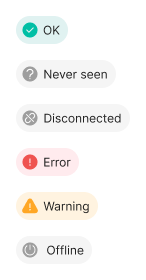
Coming soon: We're introducing a unified Device Status signal that gives operators one clear indicator of device health. Instead of piecing together telemetry, connection state, and incidents, every device now reports one of six prioritized statuses reflecting its true operational state.
Device Status combines three signals: the device's own self-reported state, the health of its upstream Xyte-monitored connection (when there is a parent device), and any active incidents. When multiple conditions apply, the higher-priority status wins.
Priority | Status | Meaning |
1 | Never seen | Created in Xyte but has never sent telemetry. Typical for claimed but not-yet-onboarded devices. |
2 | Disconnected | An upstream connection is broken — investigate the parent device. |
3 | Error | Reachable but unable to perform its primary function. Triggered by critical, high, or moderate incidents. |
4 | Warning | Functional but needs attention. Triggered by low or planning incidents. |
5 | Device offline | The device itself is unreachable, even though the upstream path is healthy — investigate power, network, or hardware. |
6 | OK | Fully connected and operating normally, with no active incidents. |
Note: Disconnected and Device offline both indicate that telemetry is not currently flowing, but they point to different root causes. Disconnected means the path between Xyte and the device is broken upstream - investigate the parent device first. Device offline means the path is healthy but the device itself is unreachable - investigate power, network, or the device hardware.