- DATE:
- AUTHOR:
- The Customer Portal team
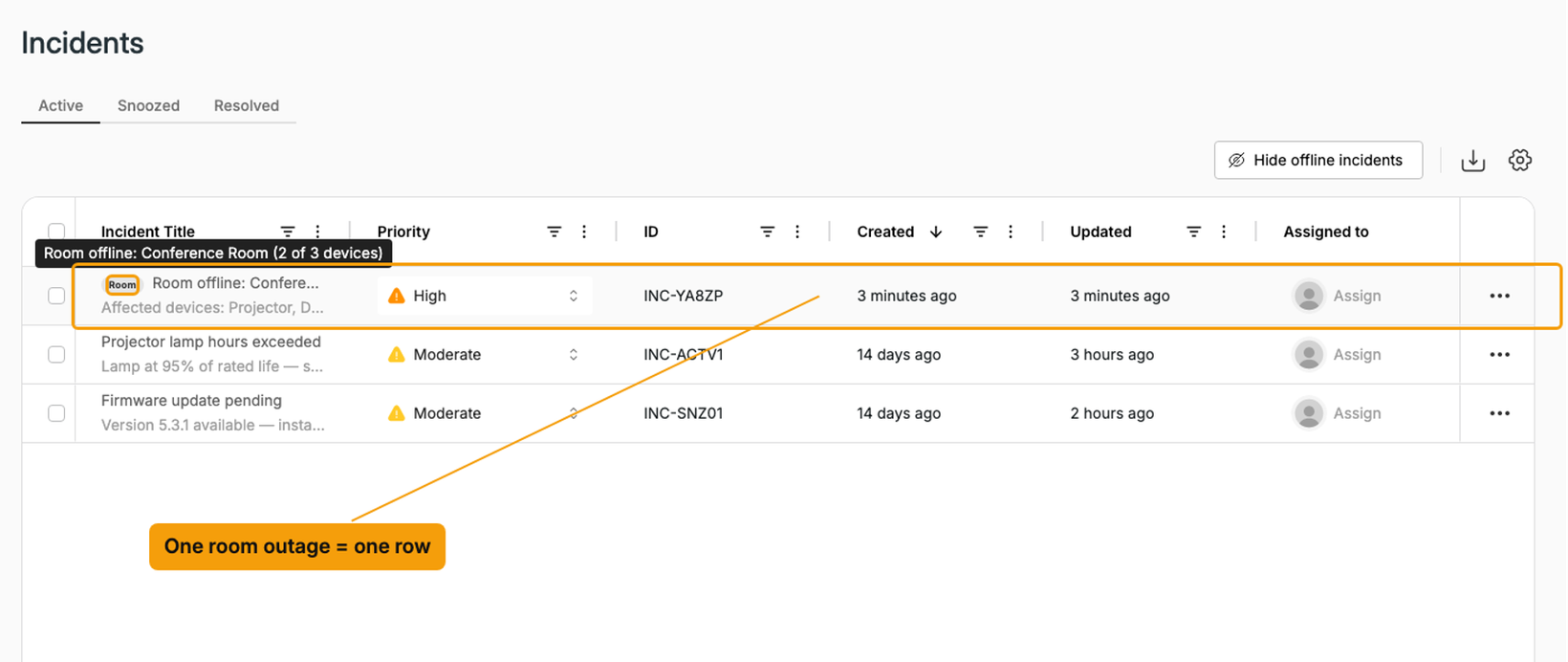
One incident per room outage
When a room loses network, you now get one Room offline incident instead of one per device.
How it works
Grouped automatically. If a second device in the same room goes offline within 15 minutes of the first, Xyte groups them into one room incident. Devices that drop later join the group.
Live count in Xyte. The incident title shows how many devices are down, for example Room offline: Boardroom 4 (3 of 8 devices). It changes to Room down when every device in the room is offline.
One ticket. ServiceNow, Slack and your other connected tools get one ticket for the outage, titled Room offline: Boardroom 4 (without the device count), not one ticket per device.
Closes once. The incident stays open until the last device recovers. Closing or snoozing it applies to every device in the room.
Device history kept. Each device still records its own incident on its Incidents tab.
Grouping applies only to devices assigned to a room. Devices in Unsorted or Unprovisioned, or assigned at floor level, keep their own separate incidents. Look for the Room badge in your incident list or contact your CSM to turn on this feature.
Please contact support@xyte.io with any questions.