- DATE:
- AUTHOR:
- The Customer Portal team
Introducing Workflows: Automate Device Routines with Scheduled Commands
Keep your devices healthy and your spaces running smoothly with our new workflow automation feature. You can now schedule commands for any device to automatically handle routine actions – reducing manual work and helping prevent issues before they impact users.
Create workflows for common tasks such as morning device checks, scheduled reboots, or input resets. Workflows can run on a daily or weekly schedule and provide clear visibility into command success or failure at the device level.
Additionally, scale automation across your environment with bulk workflows, allowing you to schedule the same command for multiple devices of the same model—all from one place.
How to create a workflow automation:
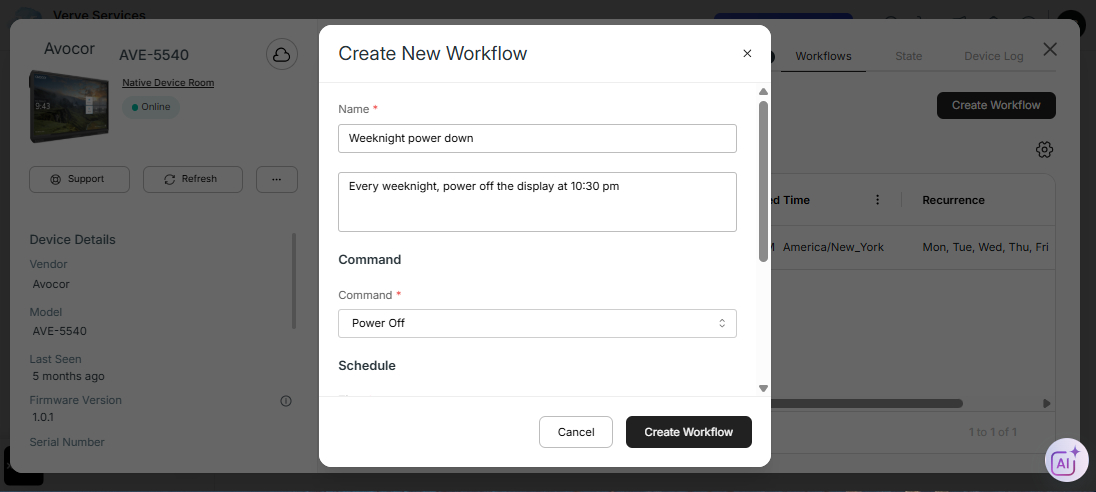
From any device dashboard, open the new workflows tab and click “Create Workflow”
Give the workflow a name and description
Select a command and schedule the time and day(s) of the week
Once saved, the list of workflows for each device will appear in the device’s workflows tab, and then prior to execution, they will appear in the device’s command queue.
To edit a workflow, click into any of data fields listed in the workflow table, and edit the workflow in the side panel.
To create the same workflow for multiple devices (of the same model), go to the device table, select the devices, click on “Create Workflows” from the black ribbon, and follow the same instructions as above.
Please contact support@xyte.io with any questions.